Create or join a battle room in Circin
Play a friend instead of a stranger — set the coin stake, share the six-character room code, or type in the one you were sent. One-to-one or up to four.
Updated
Student
A battle room lets you choose who you play. Synapse Duel → Play With Friend makes a one-against-one room; Quad Arena makes one for up to four players. Both work the same way.
How do I create a room?
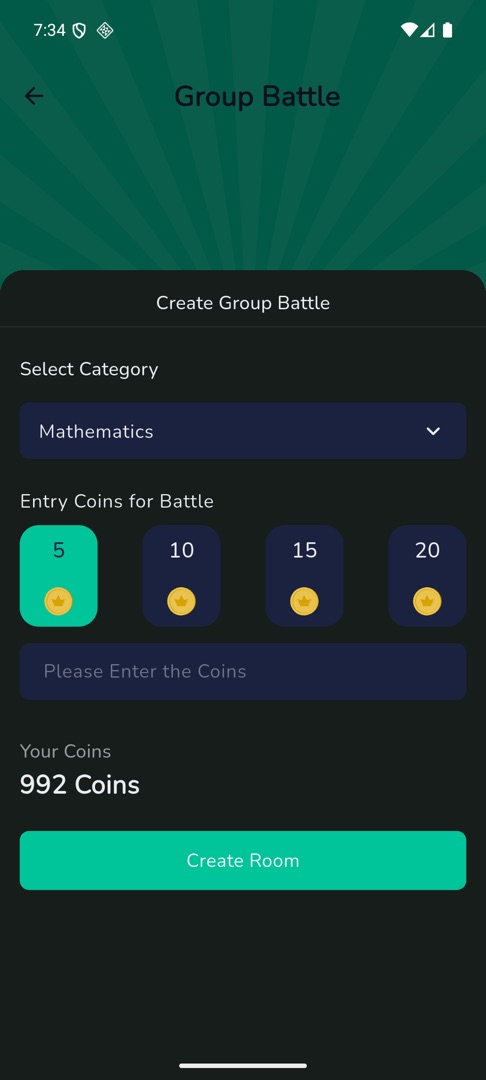
- On Home, under "Play & compete", tap Synapse Duel then Play With Friend, or tap Quad Arena (headed "Group Battle"). Then tap Create Room.
- Pick a category, if your school enabled them.
- Under Entry Coins for Battle, tap one of the four presets or type your own in the field hinted "Please Enter the Coins". A typed value wins.
- Your Coins shows your balance, with BUY COINS beside it.
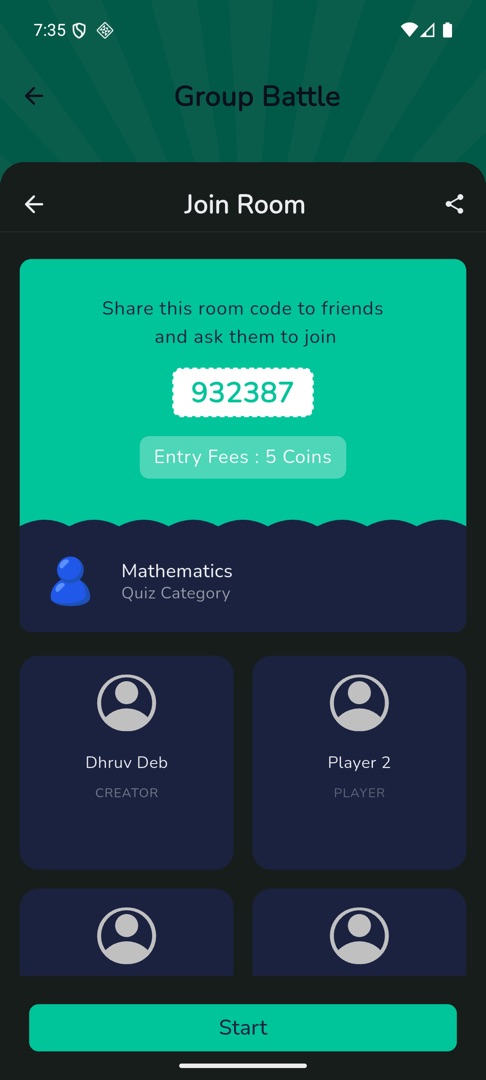
- Tap Create Room. The lobby shows the category, the fee and a six-character room code under "Share this room code to friend and ask them to join". Quad Arena shows a 2×2 grid of slots, you first as CREATOR.
- Tap the share icon to send the code.
- As players arrive their names fill the slots. Tap Start — only the creator sees that button.
How do I join someone else's room?
- Tap Quad Arena, or Synapse Duel → Play With Friend, then Join Room.
- A sheet opens headed "Enter Room Code to Join Battle" with six code boxes. Type the code you were sent.
- Tap Join Room. You land in the next free slot and wait for the creator to start.
An empty code shows "Please Enter Code to join battle". Refusals come back as a dialog: "Room code is invalid", "Game already started", "Room is full" or "Not enough coins".
Rules and gotchas
- The entry fee is charged to whoever joins as well as to the creator.
- Start needs a second player: "To begin the game, a minimum of one additional player is required."
- A zero or negative stake shows "Please enter more than zero coins"; one above your balance shows "Not enough coins".
- Backing out as the creator asks "Are you sure that you want to delete this battle room?"; everyone else then sees "Room deleted by owner".
- In Quad Arena, finishing first shows "Wait For Other to complete..."; the result is a podium under "Group Battle Result".
- On a small phone the Create Room sheet runs past the bottom of the screen, leaving Create Room below the fold — scroll the sheet to reach it.