Find your practice games in Circin
The Play tab holds Circin's quiz games. Here is what sits where — games, battles, the leaderboard, your badges — and what coins are for.
Updated
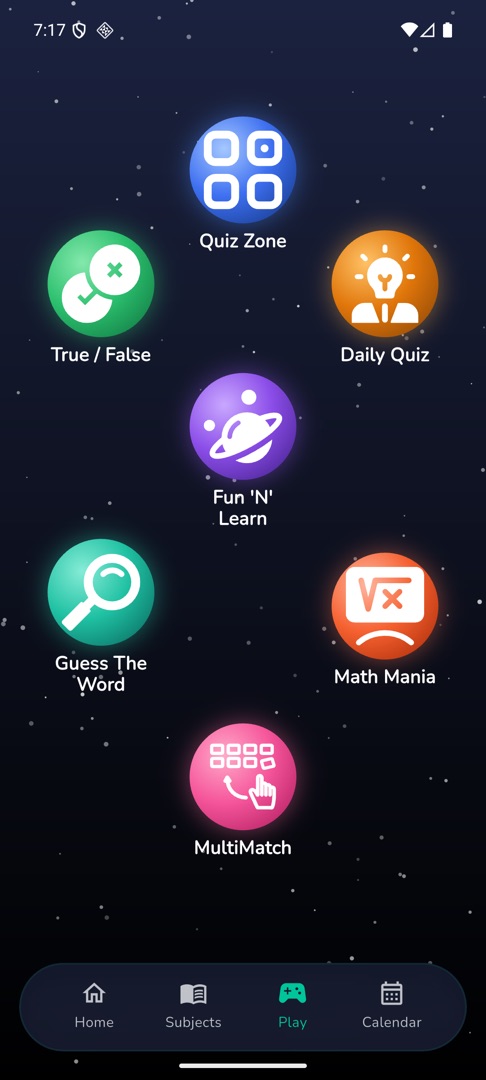
Everything you practise on outside your school subjects sits behind one tab. Tap Play in the bottom bar and Circin opens a constellation of coloured circles, one per game, with the game's name underneath. There is no title bar and no list — you tap a circle and that game starts.
Which games can appear?
Your school switches each one on or off, so you may see all of these or only a few: Quiz Zone, Daily Quiz, Fun 'N' Learn, Guess The Word, Math Mania, True / False and MultiMatch.
They do not all open the same way. Quiz Zone shows a category list first. Daily Quiz and True / False start playing straight away. The rest ask you to pick a category.
Where are battles, the leaderboard and my badges?
None of them are on the Play tab.
- Battles start from the "Play & compete" row on Home: Synapse Duel for one-against-one, Quad Arena for up to four players, and Self Challenge for a timed set on your own.
- Leaderboard — tap the Coins / Rank / Score strip at the top of Home.
- Badges, Rewards, Statistics, Coin History and Bookmarks — tap your avatar in the top right to open your profile, then the row you want.
What are coins for?
Coins are the practice-side currency. You earn them by answering correctly, by scratching reward cards and by inviting friends. You spend them on lifelines, word hints, unlocking premium categories, reviewing your answers after a quiz, and entering battles. See Track your coins and buy more.
Rules and gotchas
- If your school switches off every game, the Play tab disappears from the bottom bar altogether.
- Circin shows no adverts, so nothing here is ever unlocked by watching one.