Play a quiz in Quiz Zone in Circin
Pick a category, open a level and play. Quiz Zone is Circin's main practice game, and levels unlock one at a time as you win them.
Updated
Student
Quiz Zone is the main practice game in Circin: a set of categories, each broken into numbered levels that open one at a time as you win them.
How do I start a quiz?
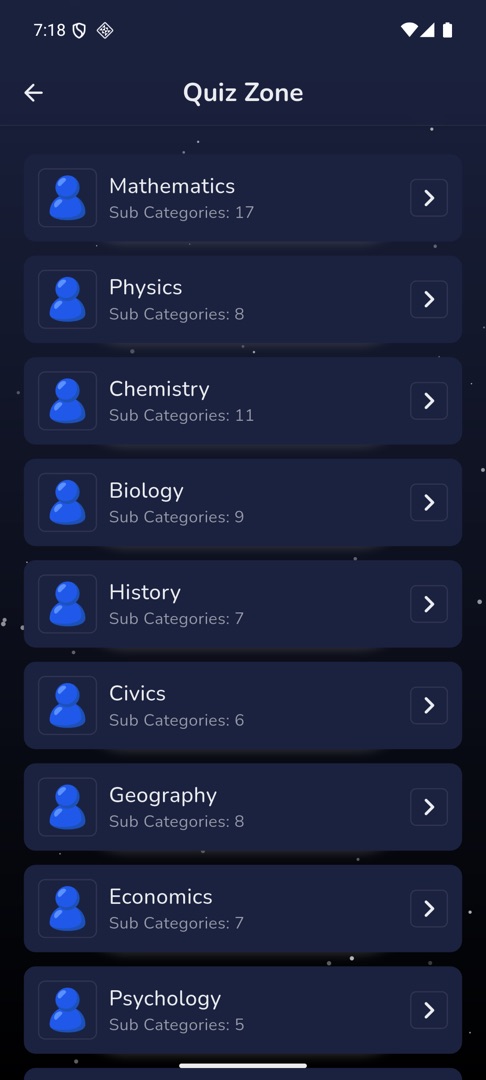
- Tap Play, then Quiz Zone. Categories load as cards, each showing either
Sub Categories: NorQuestions: N. A padlock badge means the category is premium. - Tap a category. What happens next depends on how your school built it — you get a sub-category screen, a levels screen, or the quiz starts immediately.
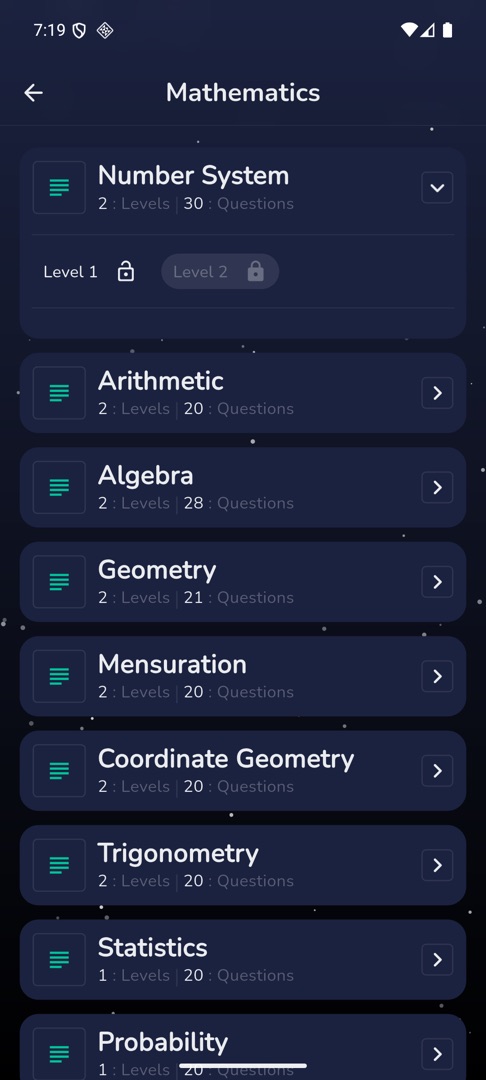
- On the sub-category screen, tap a row to expand it. It shows
{n} : Levelsand{n} : Questions, then the numbered level chips. Past six levels there is a View More / Show less toggle. - Tap an unlocked level chip to play.
- Answer each question by tapping an option. The result screen follows the last one.
- Pull down on the category list to refresh it.
Rules and gotchas
- Levels open in order. Tapping one you have not reached shows "Level is locked", and you open the next by winning the one before it.
- There is no Play Again or Next Level button on the result screen. To retry a level or move to the next one, go back to the level list. See Read your quiz result.
- A padlocked category asks for coins before it opens — see Unlock a premium quiz category.
- A category with nothing set up yet reads "No Levels".
- If you sign in to Circin on another phone, any screen here can show "Already logged in other device".