Set up a Self Challenge in Circin
Build your own timed practice set in Circin — choose the category, how many questions and how many minutes, then race one clock to the end.
Updated
Student
Self Challenge is the one game where you set the rules: the topic, the number of questions and the time you get for all of them together.
How do I run one?
- On Home, scroll to "Play & compete" and tap the Self Challenge card, subtitled "Challenge yourself".
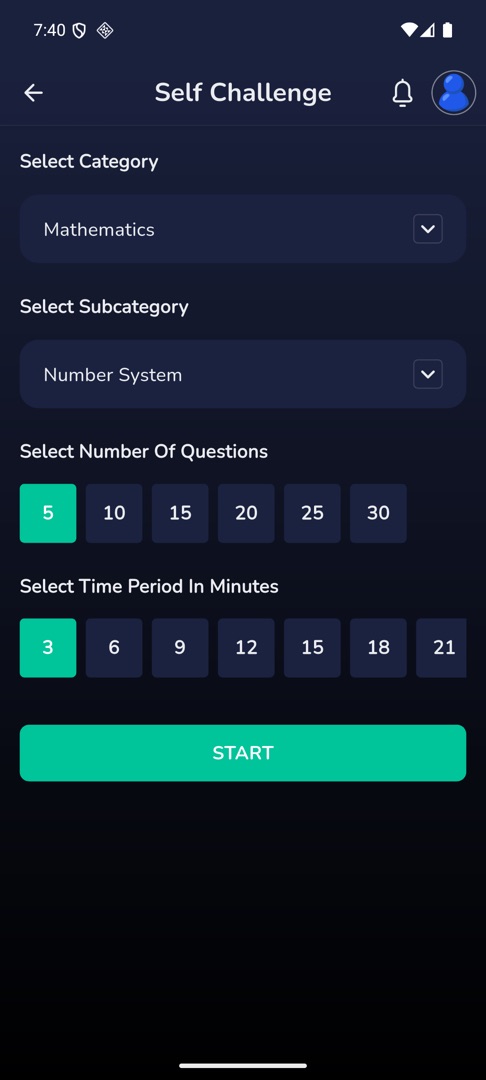
- Choose a category under Select Category, then a sub-category under Select Subcategory where the category has one.
- Pick how many questions under Select Number Of Questions — the chips step in fives.
- Pick how long under Select Time Period In Minutes — those chips step in threes.
- Tap START.
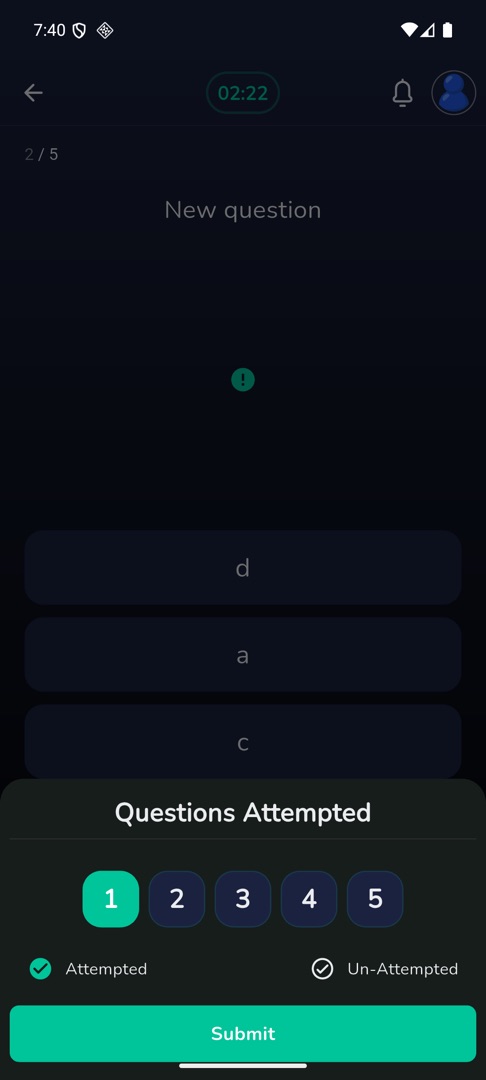
- One countdown now runs across the whole set, not per question. A panel tracks Questions Attempted, with Attempted and Un-Attempted counts.
- Tap Submit when you are done. You land on "Self Challenge Result".
Rules and gotchas
- Leaving anything unchosen shows "Please select all values" — all four choices are required, sub-category included where one exists.
- The largest number of questions and the longest time are limits your school sets, so the chips stop where it says.
- There are no lifelines in Self Challenge.
- You can pay coins to review your answers afterwards: Review your answers.