Set an assignment in Circin Maestro
Create an assignment for one or more class sections with a due date and time, points, attachments, and an optional resubmission window.
Updated
Teacher
Class Teacher
You can set homework from the phone, with files or a link attached and a due date the students' apps count down to.
How do I create an assignment?
- On Home, tap Assignments in the Workspace group. Manage Assignment opens with a Class and a Subject pill.
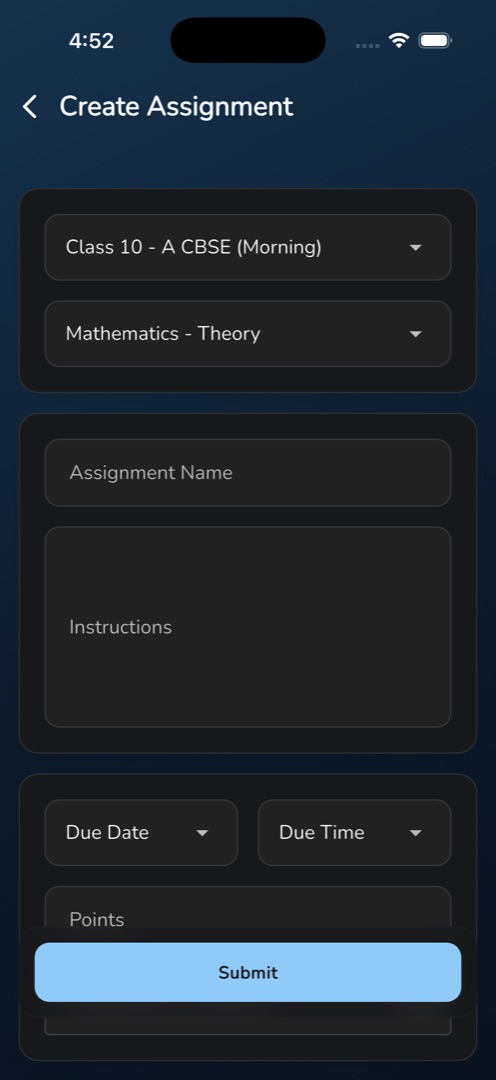
- Tap the round + button. Create Assignment opens.
- Tap the Class row — a Filter By : Class sheet lists the class sections you teach, one to a row — pick one, then do the same on the Subject row.
- Type the Assignment Name and, if it helps, Instructions.
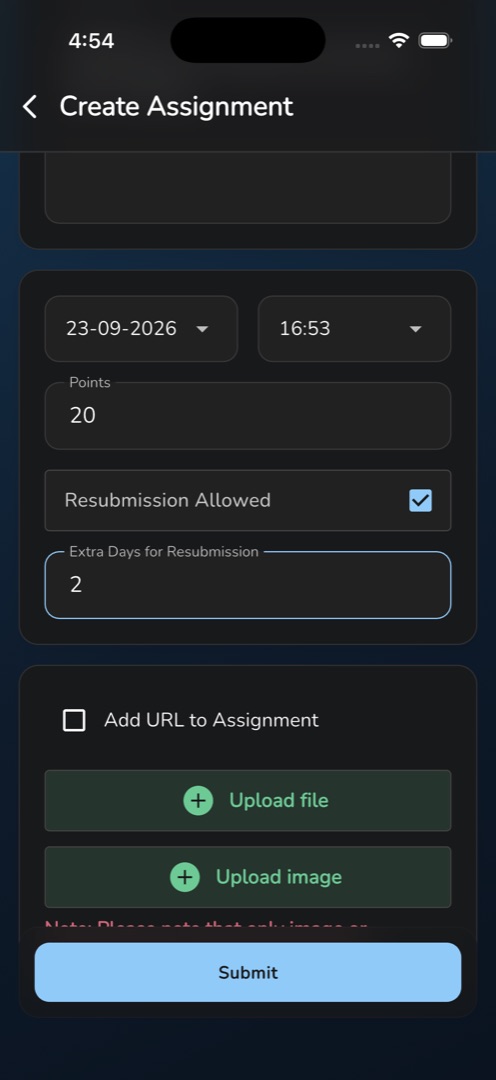
- Tap Due Date for the date picker and Due Time for the time picker.
- Type Points, or leave it blank for an ungraded assignment.
- Tick Resubmission Allowed to let a rejected student try again; that reveals Extra Days for Resubmission, which then has to be filled.
- Optionally tick Add URL to Assignment and type the link, or tap Upload file to attach files.
- Tap Submit. The snackbar reads Assignment Added Successfully — the screen stays open with every field cleared so you can set the next one. Use the back arrow to return to the list.
How do I change or remove one?
On Manage Assignment, set the Class and Subject pills so the assignment is listed, then tap the pencil on its card to edit, or the bin to delete. Editing opens the same form pre-filled with Class and Subject greyed out; deleting asks Are you sure you want to delete this? with the line This action can not be undone.
Rules and gotchas
- The due date picker allows today to today plus 30 days. You cannot set a date further out, and re-picking the date on an older assignment is capped the same way.
- One assignment covers one class section. Tapping the class that is already chosen clears it, so re-pick it before you submit.
- Class and subject are fixed once created. To move an assignment, delete it and set a new one.
- The time is not checked against the date, so an earlier time today is accepted.
- On edit, a blank name is reported but not blocked — the request goes to the server and fails there.
- Removing a file from an existing assignment happens immediately, not on Submit.
Submissions arrive on the same card: see Review assignment submissions.