View attendance for another date in Circin Maestro
Check what was recorded for your class on any date within 30 days, and look up any class in the school if you are office staff.
Updated
Also on Admin Panel: View attendance Circin: Check your attendance record in Circin
The attendance register in Circin Maestro is also how you read a past day back. One class section and one date at a time — there is no month grid in the app.
How do I see my class on another date?
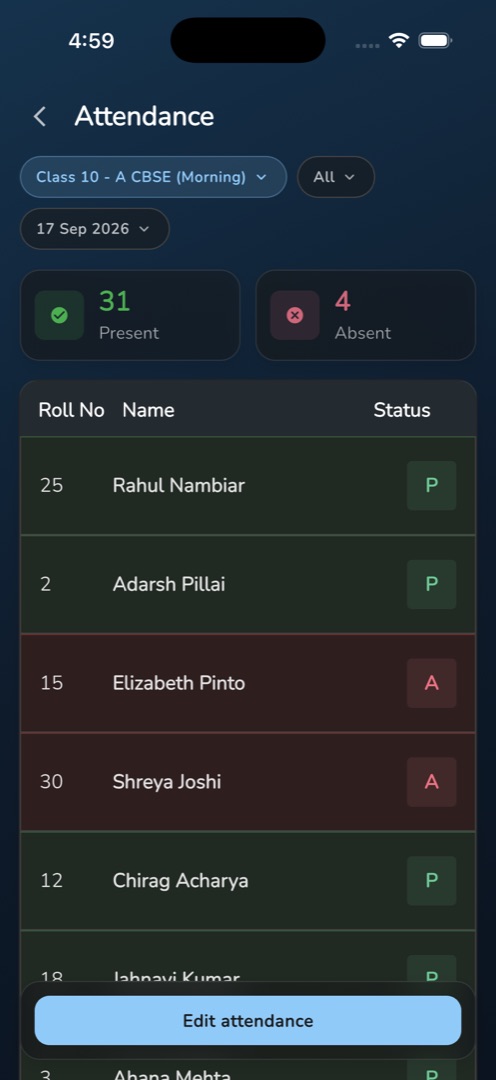
- Open Attendance from the Workspace group on Home. The date pill shows today as 19 Sep 2026.
- Tap the date pill and pick a date. The register reloads in place.
- A day with attendance saved shows read-only: Present and Absent count tiles, then each student with a P, A or -.
- Tap the status pill and choose Present or Absent to narrow the list; All restores it.
- A date with nothing saved opens in marking mode instead — that day is still open to mark. A holiday with no register shows the It's a holiday card.
How does office staff look up any class?
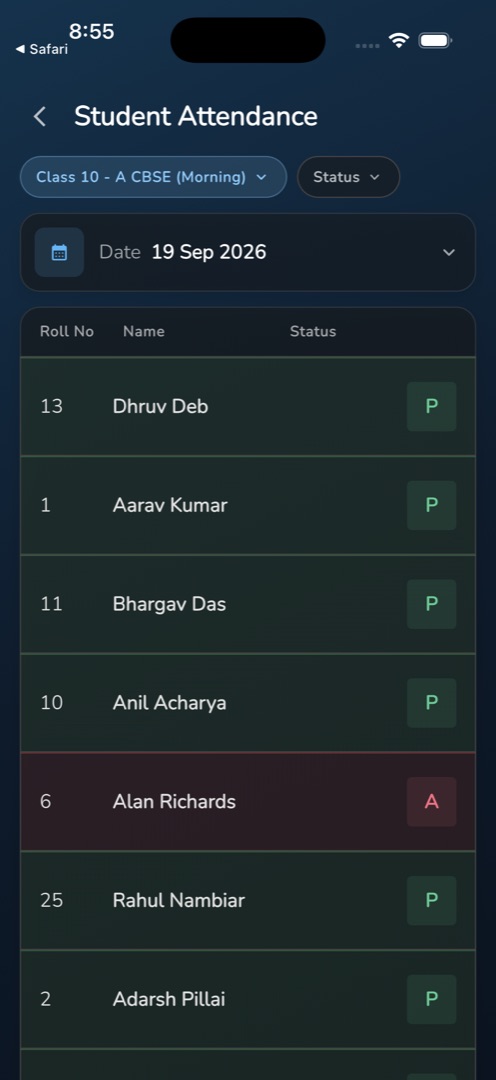
Go to the Manage tab and tap Student Attendance under People & comms. Pick a class from the Class pill — every class in the school is listed, not only your own — set the Status pill to All, Absent or Present, and tap the Date row to choose the day. The roster loads under a Roll No / Name / Status header, with a P, A or - per student, and pages as you scroll.
Rules and gotchas
- The date range is capped at today −30 days to today +30 days. Older attendance cannot be reached in the app at all; use View attendance in the admin panel.
- There is no month-wise or over-time view in Circin Maestro.
- The staff screen is read-only: no toggles, no Submit, no Scan Face. Corrections are the class teacher's, from their own register.
- The staff tile appears only where the Attendance Management module is on and the account holds the attendance-list permission.
- Attendance not taken means nothing was recorded for that class and date.