Find About, Contact and the policies in Circin Maestro
Where Circin Maestro keeps About Us, Contact Us, the privacy policy and the terms — and how to rate or share the app.
Updated
Teacher
Class Teacher
Staff
The last two groups on the Profile tab hold everything that is not a setting: what the app is, how to reach someone about it, and the documents you agreed to when you signed in.
What is in Support & Legal?
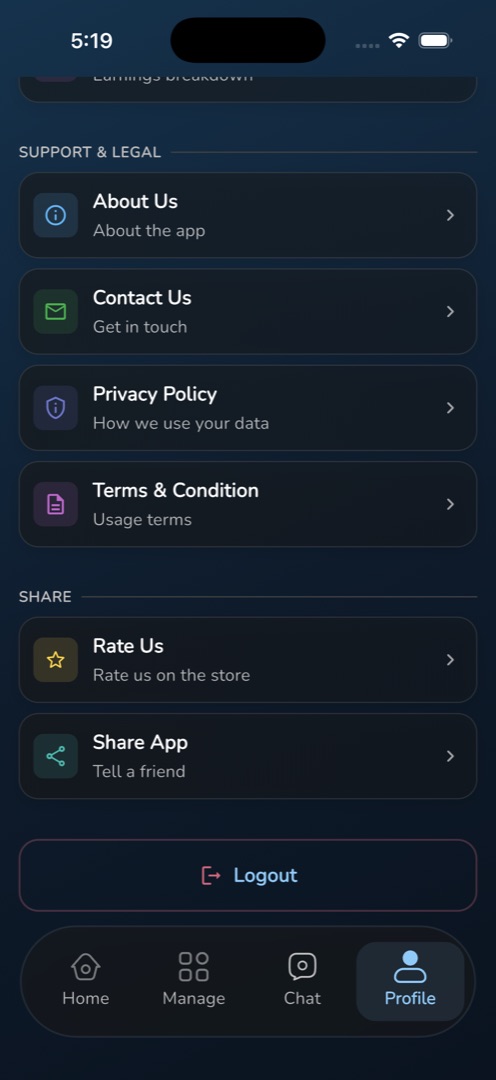
Scroll the Profile tab to Support & Legal. Four rows, each opening a page inside the app:
- About Us / About the app — what Circin Maestro is. This page ships with the app, so it reads the same at every school.
- Contact Us / Get in touch — your school's contact details, as the office wrote them in the admin panel. It is fetched when you open it, so it needs a connection.
- Privacy Policy / How we use your data — the Circin privacy policy, also shipped with the app.
- Terms & Condition / Usage terms — the terms you accepted at sign-in.
How do I rate or share the app?
Below them, the Share group has two rows. Rate Us / Rate us on the store opens Circin Maestro's store listing so you can leave a review. Share App / Tell a friend opens the share sheet with the same link, for sending to a colleague.
Rules and gotchas
- Contact Us is the only one of the four that comes from your school. If it is empty or wrong, the office fixes it in the admin panel, not in the app.
- If nothing happens on Rate Us or Share App, your school has not set an app link. The message points at App Settings under System Settings in the admin panel.
- None of these pages can be edited, searched or copied from the app.
- About Us, Privacy Policy and Terms & Condition are part of the installed app, so they only change when you update Circin Maestro from the store.