Classes
Create a class in Circin by choosing its medium, name and sections, with optional shift and stream — the backbone of your academic setup.
Updated
School Admin
A class in Circin ties together a medium, a name (such as Class 10), its sections, and optionally a shift and stream. Classes are the backbone of your academic setup — students, subjects, timetables and attendance all hang off them.
How do I create a class?
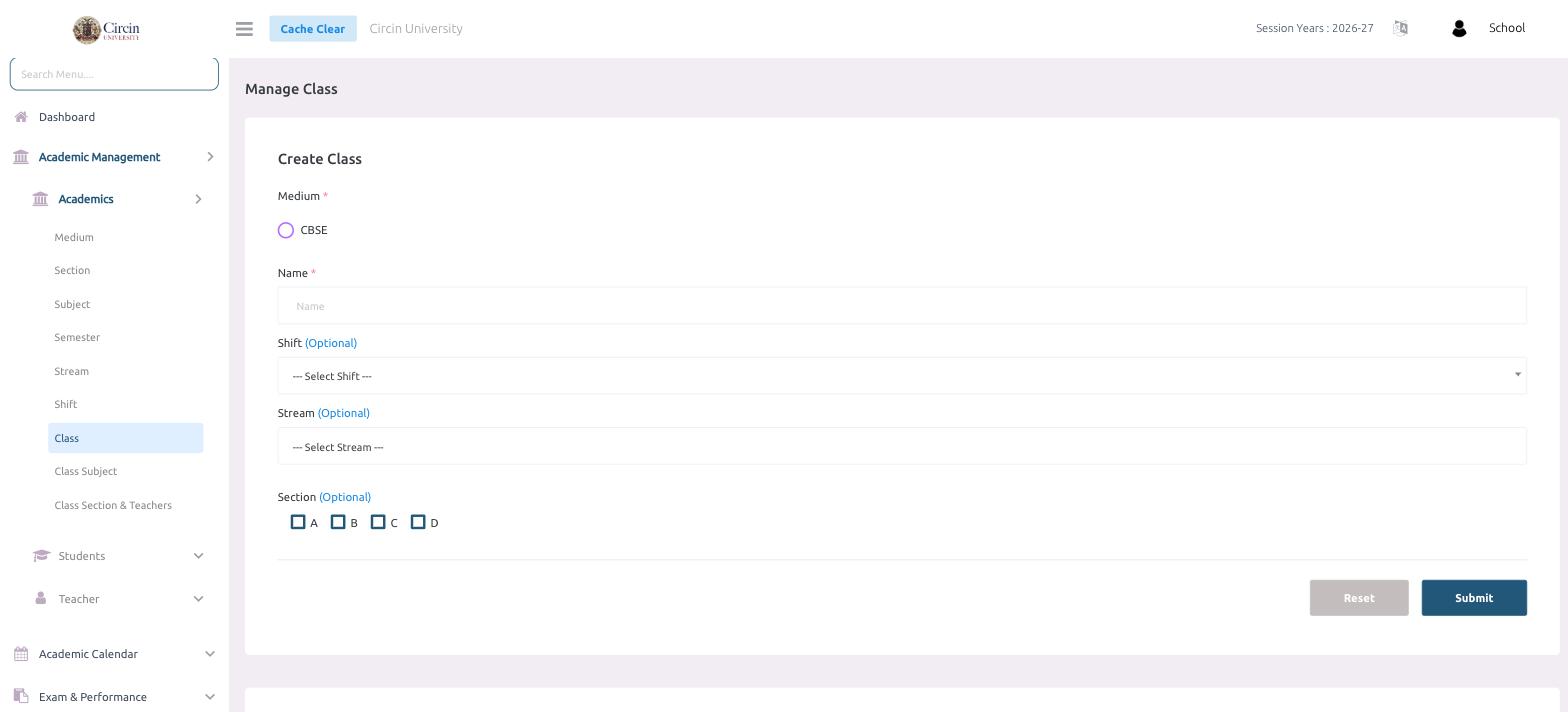
- In the left menu, open Academic Management → Academics → Class. The page is titled Manage Class.
- In Create Class, select the Medium (for example, CBSE).
- Enter the class in the Name field.
- Optionally choose a Shift from --- Select Shift ---.
- Optionally choose a Stream from --- Select Stream ---.
- Under Section (Optional), tick the sections this class runs — A, B, C or D.
- Click Submit. Use Reset to clear the form.
What do I need before creating a class?
The dropdowns and checkboxes here draw on settings you create first: add your Medium, Sections, and — if you use them — your Shift and Stream before building classes, so each option is available to pick.