Exam questions
Add a question to an online exam in Circin — choose class and subject, write the question, add answer options, mark the correct answer, and set difficulty.
Updated
School Admin
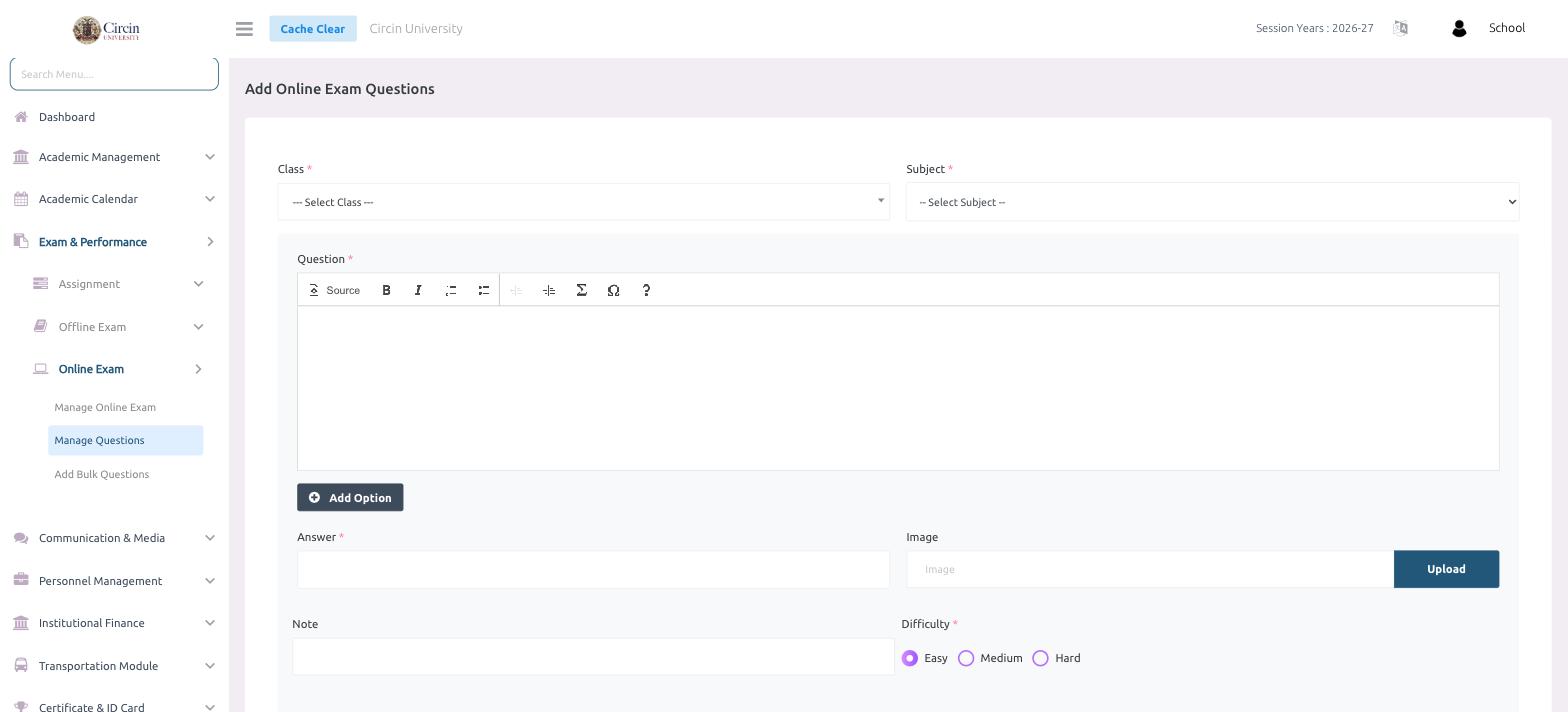
Manage Questions is where you build an online exam's question bank one question at a time. You pick the class and subject, write the question, add its answer options, mark the correct answer, and set how hard it is.
How do I add a question?
- In the left menu, open Exam & Performance → Online Exam → Manage Questions.
- Choose the Class and the Subject.
- Type the question in the Question editor — it has a formatting toolbar with Source, bold, italic, and list options.
- Click Add Option to add each answer choice.
- In Answer, enter the correct answer.
- Optionally add a Note, and use Upload under Image to attach a picture to the question.
- Set the Difficulty — Easy, Medium, or Hard.
Tips
- To add many questions at once instead of one at a time, use Add Bulk Questions with a .csv upload.
- The Difficulty setting lets you balance an exam across easy, medium, and hard questions.