Subjects
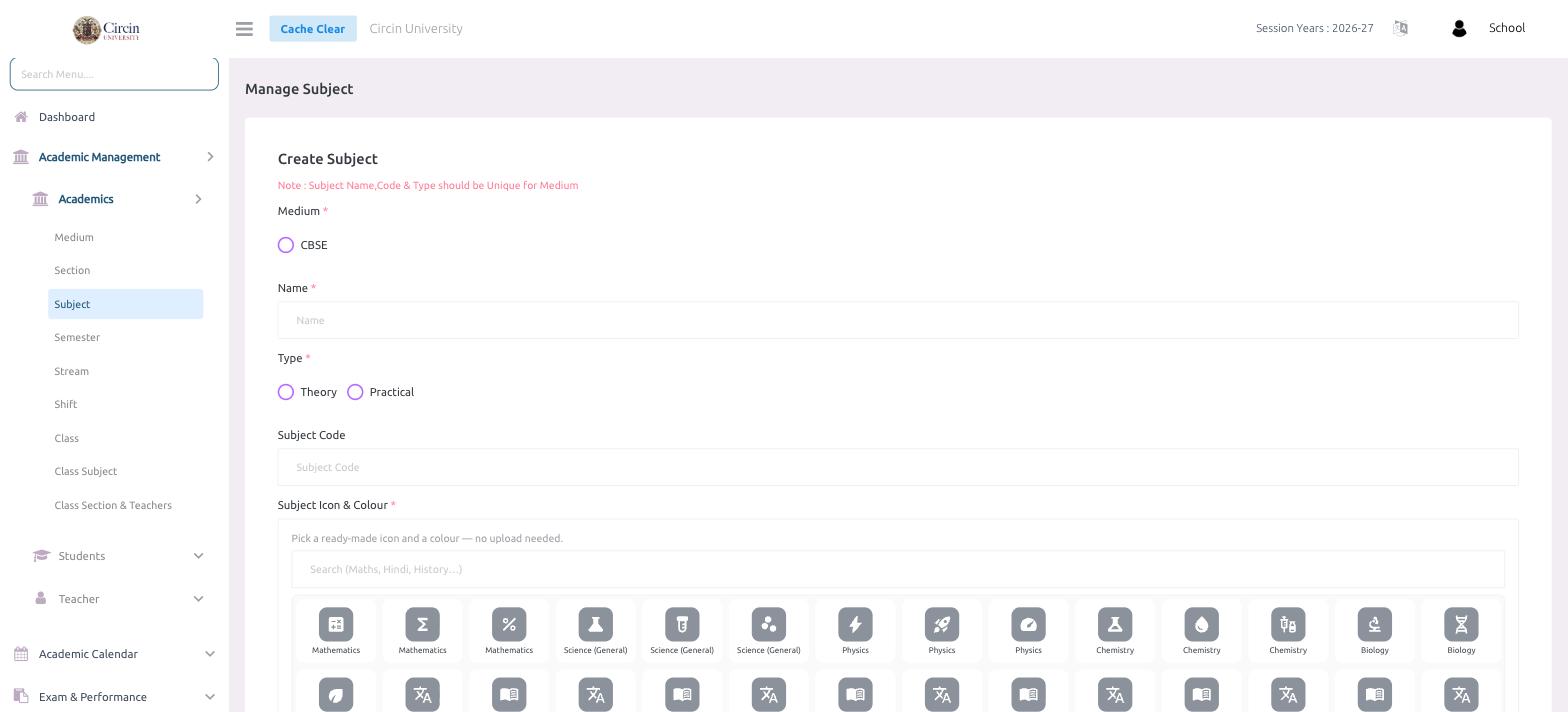
Create a subject in Circin by choosing its medium, name, type (Theory or Practical), optional code, and a ready-made icon and colour.
Updated
School Admin
A subject in Circin is a course you teach, such as Mathematics or Science. Each subject belongs to a medium and is marked as Theory or Practical. A note on the page reminds you that the Subject Name, Code & Type should be Unique for Medium.
How do I add a subject?
- In the left menu, open Academic Management → Academics → Subject. The page is titled Manage Subject.
- In Create Subject, select the Medium (for example, CBSE).
- Enter the subject in the Name field.
- Choose the Type — Theory or Practical.
- Optionally enter a Subject Code.
- Under Subject Icon & Colour, pick a ready-made icon and a colour — no upload is needed. Use the Search (Maths, Hindi, History…) box to filter the icon grid, then click the icon you want.
- Submit the form to save the subject.
Tips
- The icon picker offers labelled ready-made icons (Mathematics, Science, Physics, Chemistry, Biology and more), so most subjects need no custom artwork.
- Because names and codes are unique per medium, you can reuse the same subject name under a different medium.