Class sections & teachers
Assign a class teacher and subject teachers to each class and section in Circin from the Manage Class Section & Teachers page.
Updated
School Admin
The Class Section & Teachers page in Circin is where each class and section gets its Class Teacher and its Subject Teachers — the person in charge of the section and the teacher responsible for each subject in it.
How do I assign teachers to a class section?
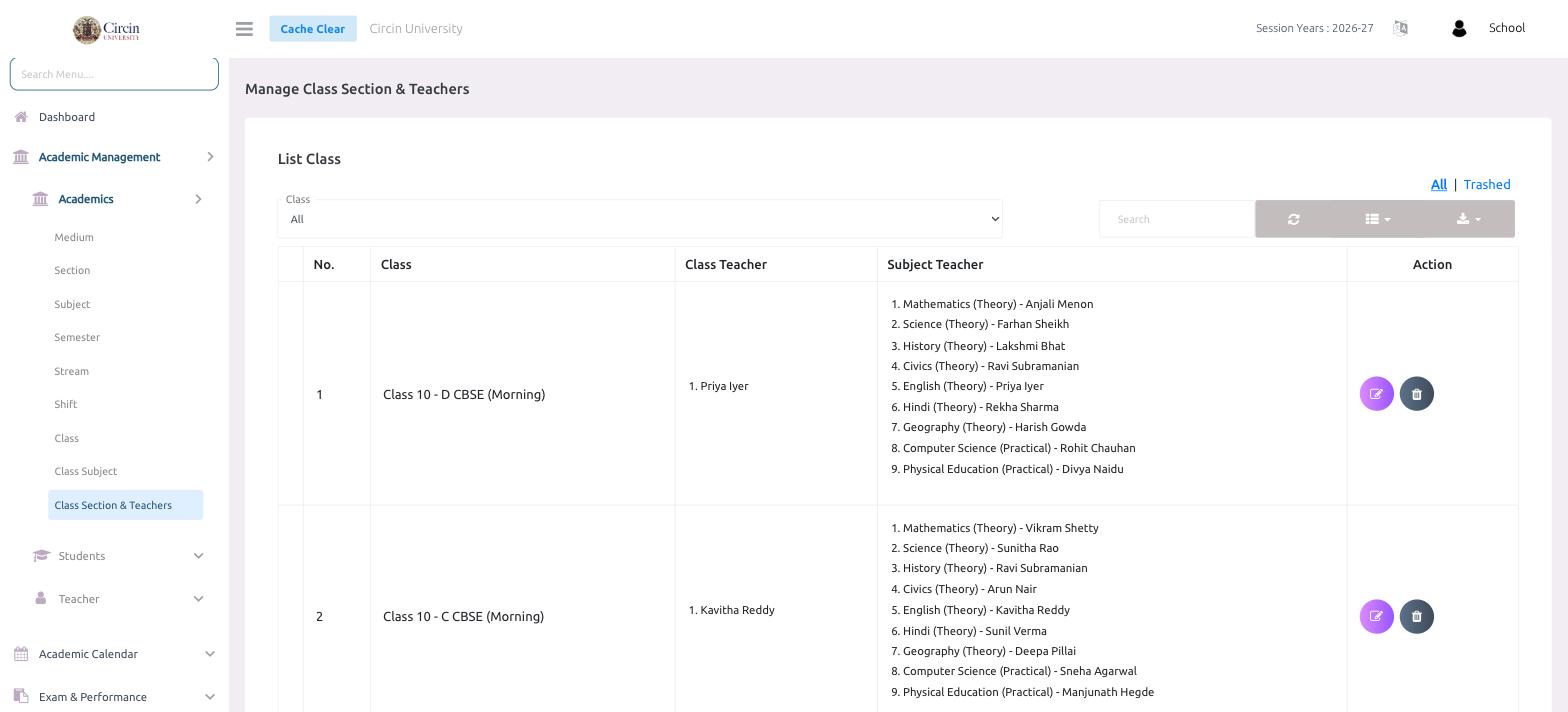
- In the left menu, open Academic Management → Academics → Class Section & Teachers. The page is titled Manage Class Section & Teachers.
- Use the Class dropdown (default All) to filter, or the Search box to find a class.
- The List Class table shows each class-section with columns for No., Class, Class Teacher, Subject Teacher and Action.
- Click the Action (edit) icon on a row to set or change the class teacher and the subject teachers.
What does each column show?
- Class — the class, section, medium and shift, for example Class 10 - D CBSE (Morning).
- Class Teacher — the teacher in charge of that section, such as Priya Iyer.
- Subject Teacher — the teacher for each subject with its type, for example Mathematics (Theory) - Anjali Menon or Computer Science (Practical) - Rohit Chauhan.
Use the All and Trashed tabs to switch between active and removed assignments.