Drivers & helpers
Add transport drivers and helpers in Circin with their contact details, licence, salary, and optional allowances and deductions.
Updated
School Admin
Drivers and helpers are the transport staff you assign to route vehicles. Add each person once with their Role, contact details, licence and Salary, and they become selectable when you assign a vehicle to a route.
How do I add a driver or helper?
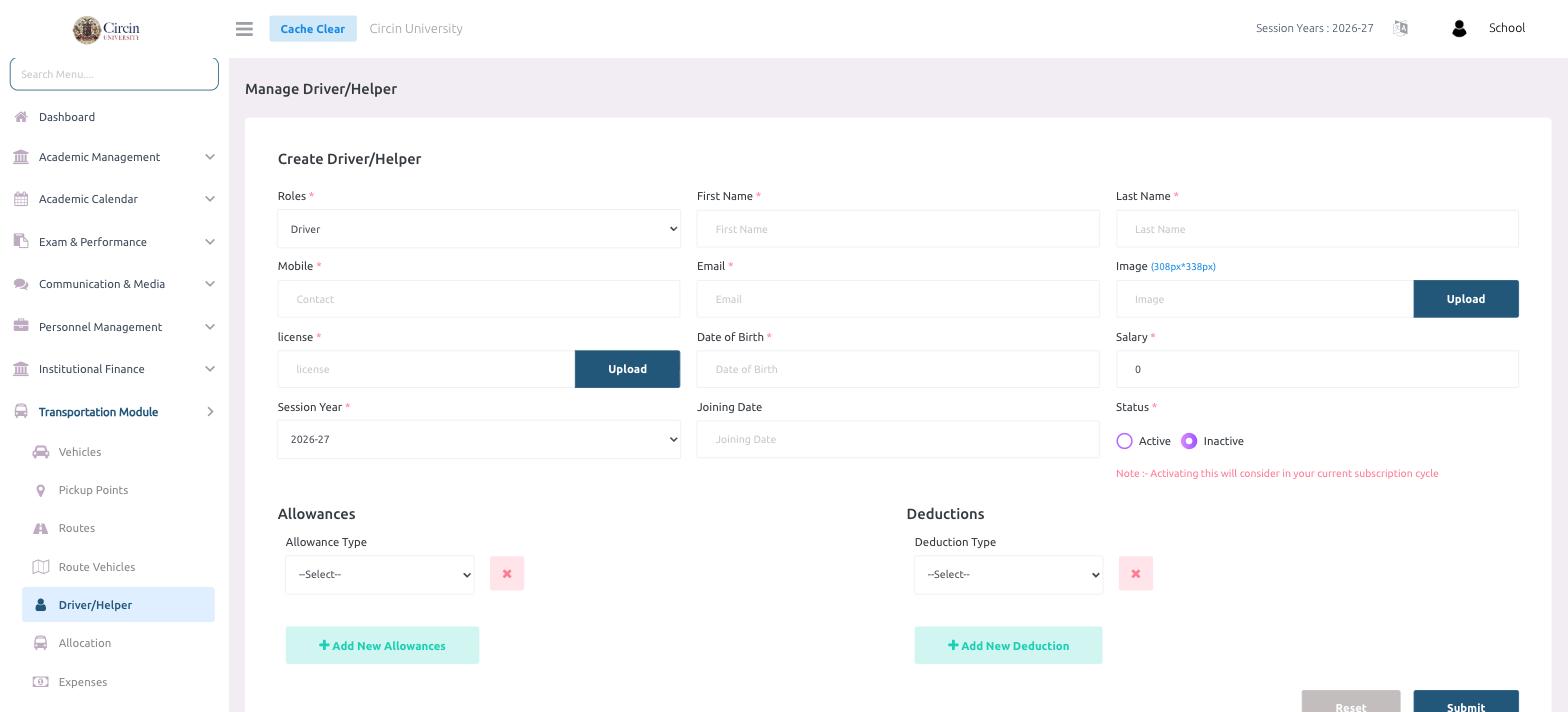
- In the left menu, open Transportation Module → Driver/Helper.
- Under Create Driver/Helper, choose the Roles — Driver or Helper.
- Enter the First Name, Last Name, Mobile and Email.
- Optionally Upload an Image (308px × 338px).
- Upload the license document, and enter the Date of Birth.
- Enter the Salary and choose the Session Year (for example, 2026-27). Optionally set the Joining Date.
- Set the Status to Active or Inactive.
- Click Submit.
How do I add allowances or deductions?
Below the main form, use the Allowances section — pick an Allowance Type and click Add New Allowances — and the Deductions section — pick a Deduction Type and click Add New Deduction — to build up the person's pay components.
Note: Setting the status to Active notes that activating this will consider in your current subscription cycle, so activate only the staff you're actually running.