Transport expenses
Record fuel, repair and other transport costs against a vehicle in Circin, with a category, amount, date and an optional receipt.
Updated
School Admin
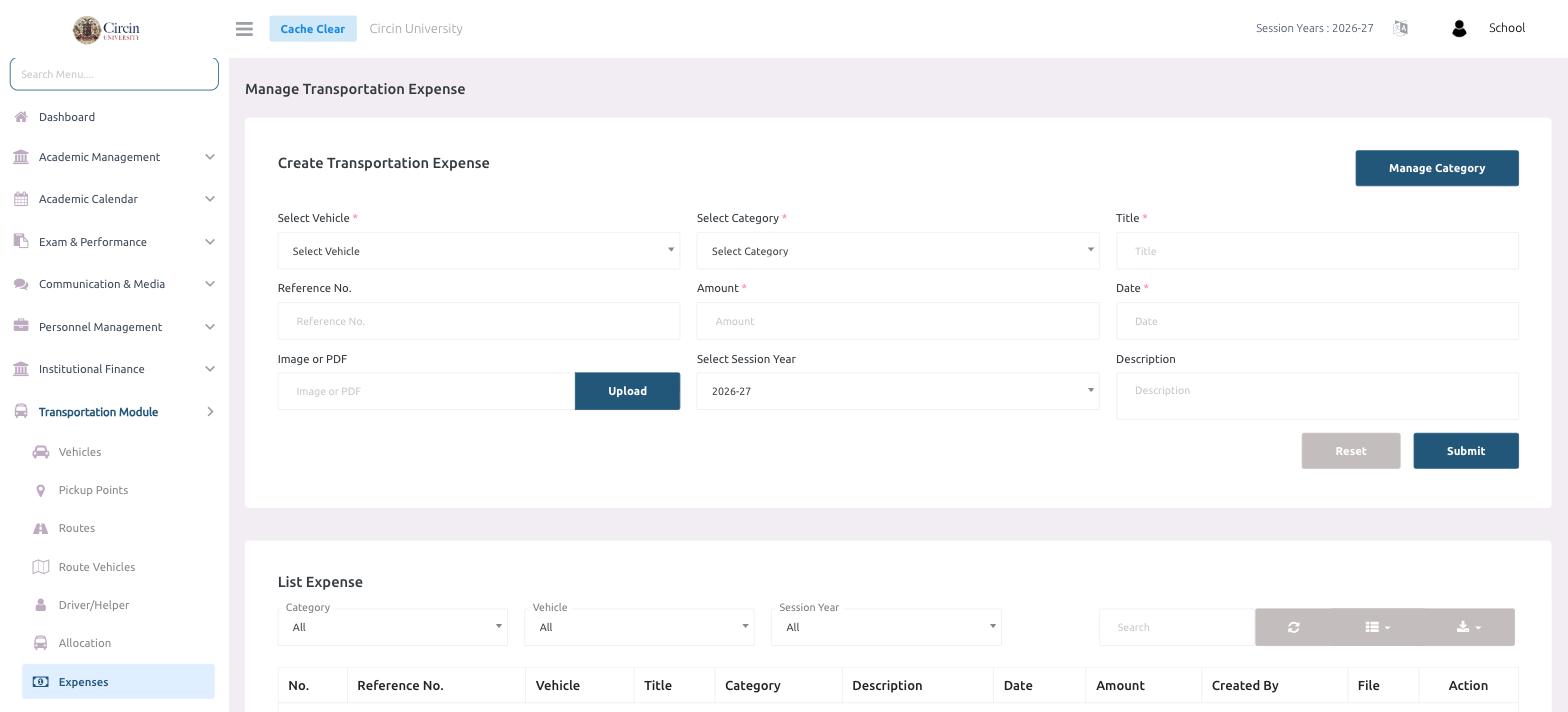
Transportation expenses let you track what each vehicle costs to run. Log every cost against a Vehicle and a Category, attach the receipt, and review the totals in the List Expense table.
How do I record a transportation expense?
- In the left menu, open Transportation Module → Expenses.
- Under Create Transportation Expense, choose the Select Vehicle the cost belongs to.
- Choose the Select Category (use Manage Category at the top right to add categories first if needed).
- Enter a Title for the expense.
- Optionally add a Reference No., then enter the Amount and the Date.
- Optionally Upload an Image or PDF of the bill, and confirm the Select Session Year (for example, 2026-27). Add a Description if useful.
- Click Submit. Use Reset to clear the form.
Where do I see all expenses?
The List Expense table shows every entry with columns for No., Reference No., Vehicle, Title, Category, Description, Date, Amount, Created By, File and Action. Filter the list by Category, Vehicle and Session Year, or use the Search box to narrow it down.