Mediums
A medium is how your school streams classes — a board like CBSE or ICSE, a language like English or Hindi, or a combination such as English CBSE.
Updated
A medium in Circin is the stream your school organises its classes under, and it's deliberately flexible — you decide what it represents:
- a board — CBSE, ICSE, IB, or a state board;
- a language medium — English, Hindi, Marathi, and so on;
- or a combination of the two — for example English CBSE or Hindi State Board.
Set up the ones your school actually offers. Medium is the first thing you create in Academics, because subjects, classes and class-subjects are all defined per medium — so a student in English CBSE and one in Hindi State Board can follow different subject lists under the same school.
How do I add a medium?
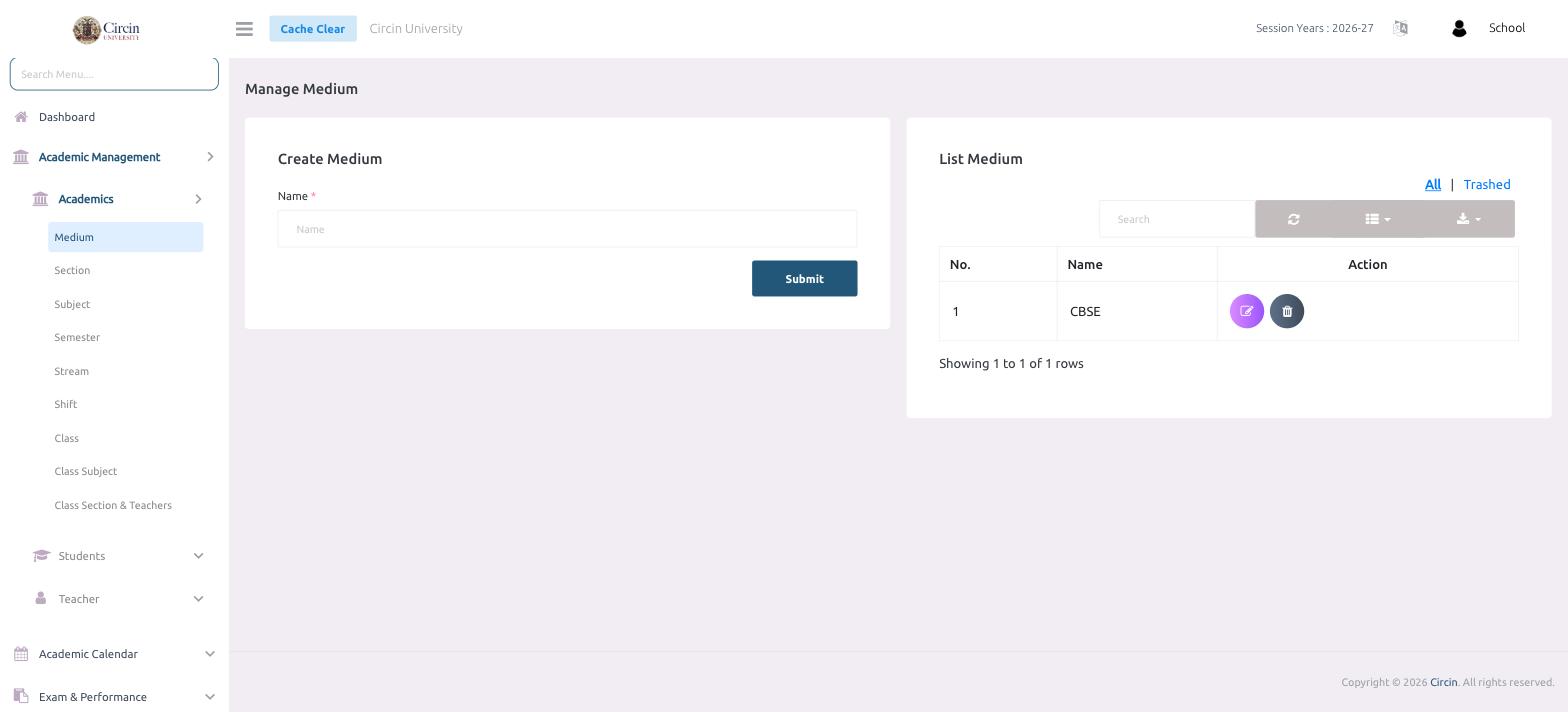
- In the left menu, open Academic Management → Academics → Medium. The page is titled Manage Medium.
- In the Create Medium panel, type the medium in the Name field — a board (CBSE, ICSE), a language (English, Hindi), or a combination (English CBSE), whatever fits your school.
- Click Submit. Repeat for each medium your school runs.
Your new medium appears in the List Medium panel on the right, which shows a numbered table with No., Name and Action columns.
How do I edit or remove a medium?
Each row in List Medium has Action icons to edit or delete that medium. Use the All and Trashed tabs above the table to switch between active and deleted mediums, and the Search box to find one by name.