Shifts
Create a school shift in Circin by naming it and setting a start and end time, such as Morning 08:00 AM to 03:30 PM.
Updated
School Admin
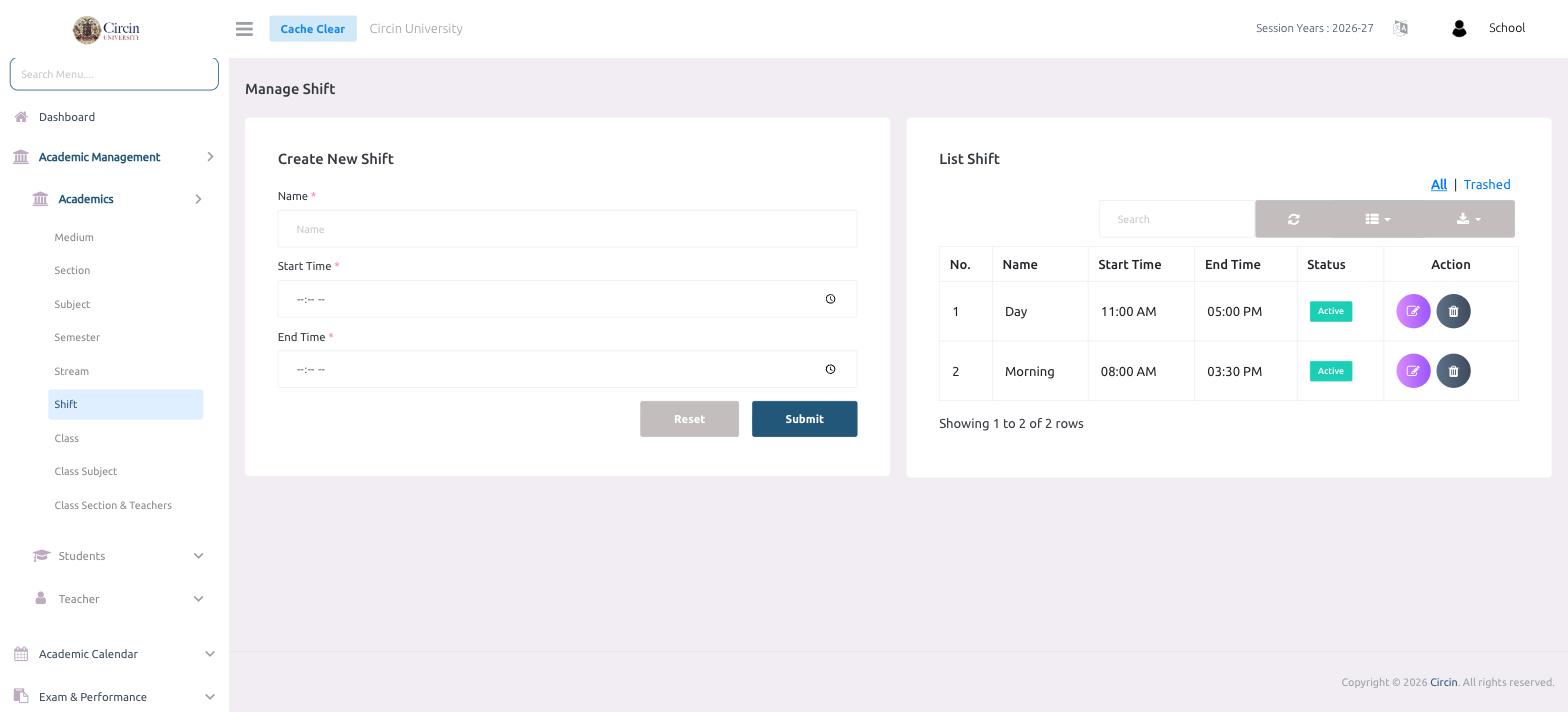
A shift in Circin is a named daily time band a class runs in — for example Morning (08:00 AM–03:30 PM) or Day (11:00 AM–05:00 PM). Schools with more than one sitting create a shift for each and attach it to the relevant classes.
How do I add a shift?
- In the left menu, open Academic Management → Academics → Shift. The page is titled Manage Shift.
- In the Create New Shift panel, type the shift in the Name field.
- Set the Start Time.
- Set the End Time.
- Click Submit. Use Reset to clear the form.
The shift is added to the List Shift table on the right, which shows No., Name, Start Time, End Time, Status and Action columns. New shifts show an Active status.
How do I edit or remove a shift?
Each row has Action icons to edit or delete the shift, and the All / Trashed tabs switch between active and removed shifts.