Expenses
Record a school expense in Circin — pick a category, add a title, amount and date, then filter the expense list by session, category, and month.
Updated
School Admin
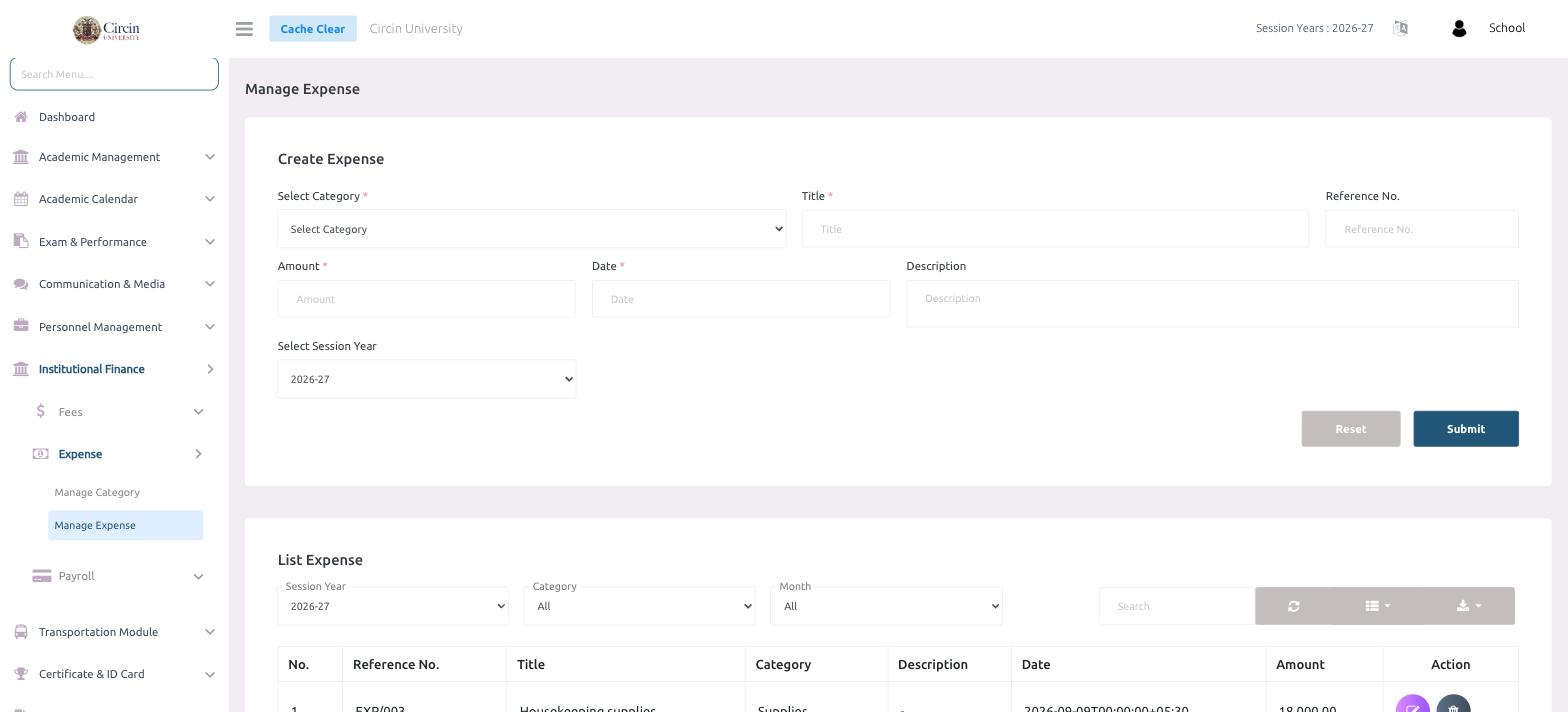
Manage Expense is where you log each piece of school spending against a category, and review everything you have recorded. Adding one takes a category, title, amount, and date.
How do I record an expense?
- In the left menu, open Institutional Finance → Expense → Manage Expense.
- Under Create Expense, choose Select Category (required).
- Enter a Title (required), and optionally a Reference No.
- Enter the Amount (required) and the Date (required), and an optional Description.
- Choose the Select Session Year, then click Submit. Use Reset to clear the form.
How do I review recorded expenses?
Under List Expense, filter by Session Year, Category, and Month. The table shows each No., Reference No., Title, Category, Description, Date, Amount, and an Action column to edit or delete an entry. Use the Search box or export button to filter and download the list.