Holidays
Add school holidays in Circin by entering a date and title on the Holiday List page, then review or remove them in the list below.
Updated
School Admin
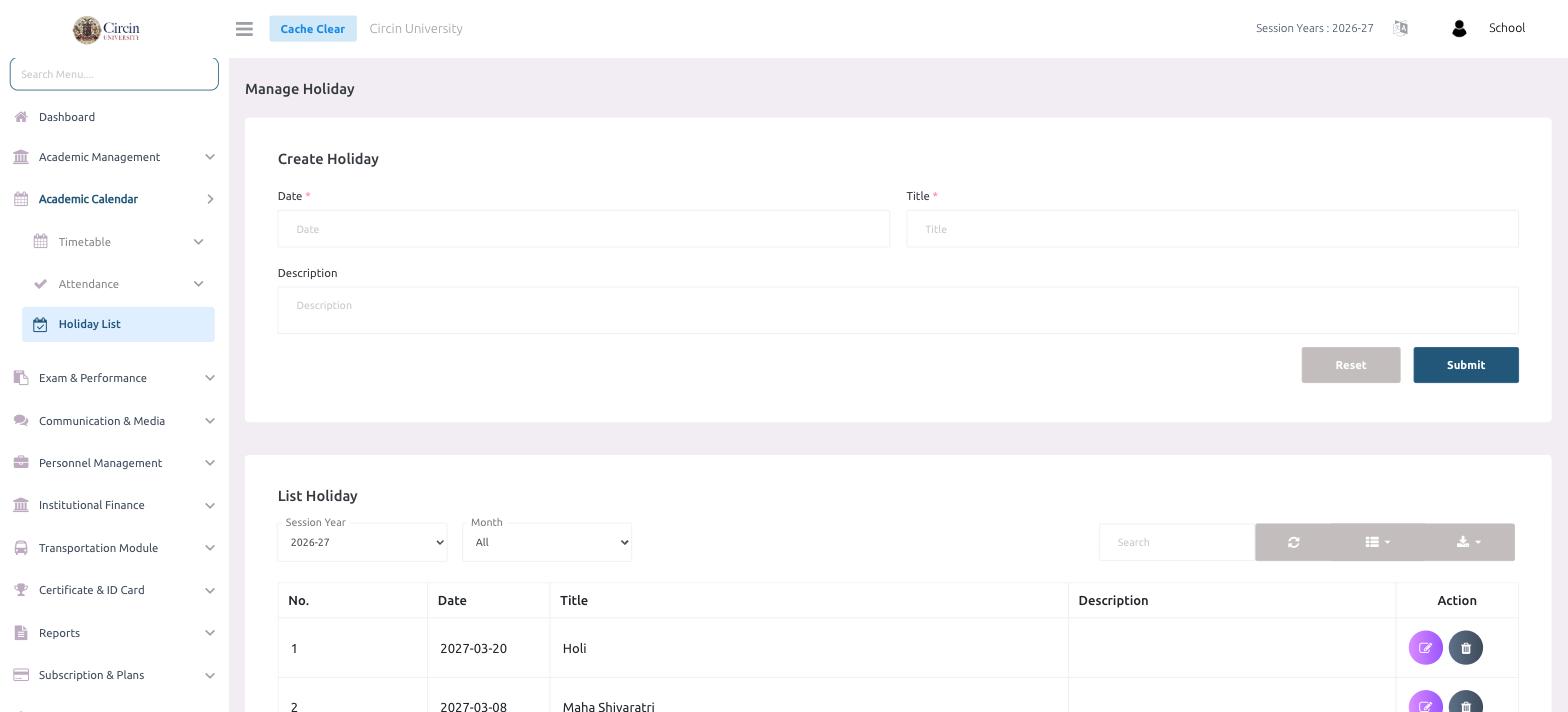
To record a school holiday in Circin, open the Holiday List page, enter the Date and a Title, and click Submit. The holiday is added to the list below, where you can review every holiday for the session and remove any you no longer need.
How do I add a holiday?
- In the left menu, open Academic Calendar → Holiday List.
- Under Create Holiday, pick the Date of the holiday.
- Enter a Title, for example Holi or Maha Shivaratri.
- Optionally add a Description.
- Click Submit. The holiday appears in the List Holiday table below. Use Reset to clear the form and start again.
How do I review or remove holidays?
The List Holiday table shows each holiday's No., Date, Title and Description, with an Action column. Filter the list with the Session Year and Month dropdowns, or use the Search box. Each row's Action buttons let you edit the holiday or delete it.
Tips
- Keep titles clear and specific — they are what staff and parents see on the calendar.
- Use the toolbar icons above the list to refresh, change the column view or export the holiday list.