Diary categories
Set up positive and negative diary categories in Circin so every diary note a teacher sends home is tagged as praise or a concern.
Updated
School Admin
Diary categories are the labels teachers pick when they write a home-diary note in Circin. Each one is either Positive or Negative, so a note reads clearly as praise or a concern. You create them once, then reuse them across every diary entry.
How do I add a diary category?
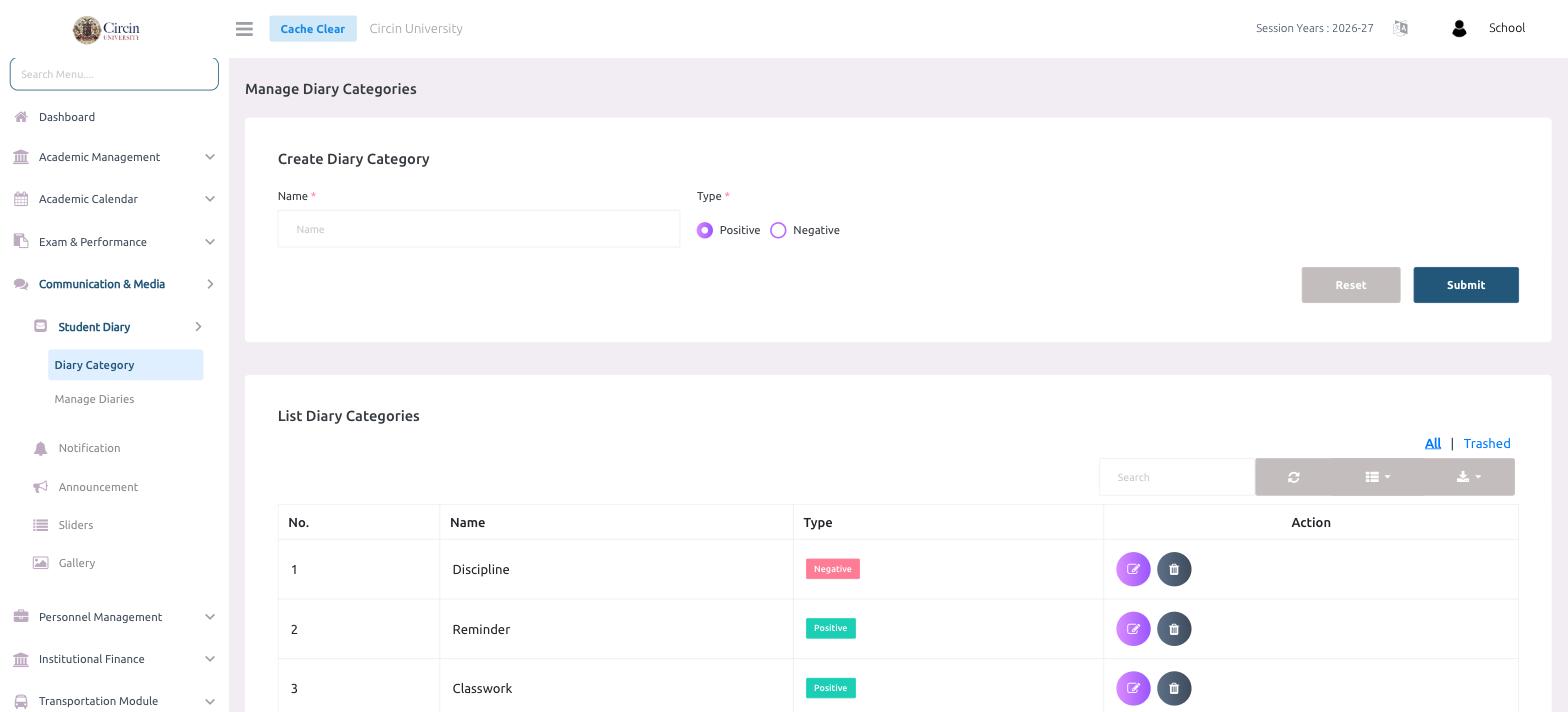
- In the left menu, open Communication & Media → Student Diary → Diary Category. This opens the Manage Diary Categories page.
- In the Create Diary Category panel, type a Name (for example, Classwork or Discipline).
- Choose a Type — Positive or Negative.
- Click Submit. Use Reset to clear the form and start over.
Where do I see my categories?
The List Diary Categories table below the form shows every category with its No., Name, and Type — Negative categories show a red badge, Positive ones a green badge. Use the edit and delete icons under Action to change or remove a category. Toggle between All and Trashed to review deleted categories.
Tips
- Keep the names short and specific — teachers pick these from a dropdown when writing a diary.
- The Type you choose here controls how the note is styled for parents in the app.