Student diary
Send a home-diary note to a class in Circin — pick a category, class section and subject, write the message, and choose which students receive it.
Updated
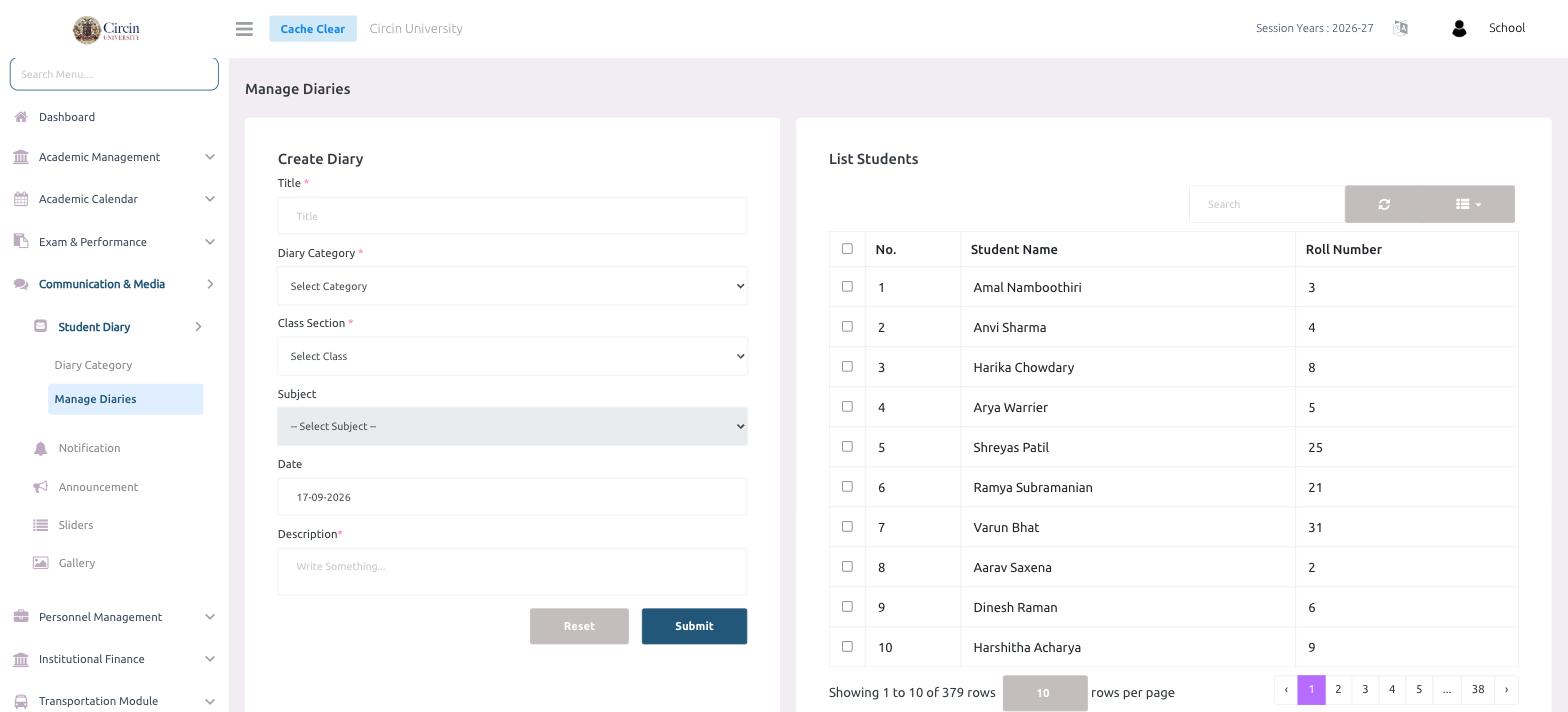
The student diary lets a teacher send a dated note home to a class — classwork, homework, a reminder, or a discipline note. You fill in the note on the left, then tick the students who should get it on the right, and submit.
How do I create a diary entry?
- In the left menu, open Communication & Media → Student Diary → Manage Diaries.
- In the Create Diary panel, enter a Title.
- Choose a Diary Category from the Select Category dropdown (these come from your Diary Categories).
- Choose the Class Section from Select Class. The Subject dropdown then lets you pick the relevant subject.
- Set the Date — it defaults to today.
- Write the note in Description.
How do I choose who receives it?
The List Students panel on the right shows every student in the selected class as a table of No., Student Name, and Roll Number, each with a checkbox. Tick the students who should receive the diary, or use the header checkbox to select the whole page. Use the Search box to find a student, and the pager at the bottom to move between pages.
When the note and recipients are set, click Submit. Reset clears the form.