Fee types
Set up reusable fee heads like Tuition or Excursion Fee in Circin — give each one a name and description, then build fee plans on top of them.
Updated
School Admin
Fees types are the reusable heads — Tuition, Transport, Excursion Fee — that you later combine into a class fee plan. Creating one in Circin takes a name and an optional description.
How do I create a fees type?
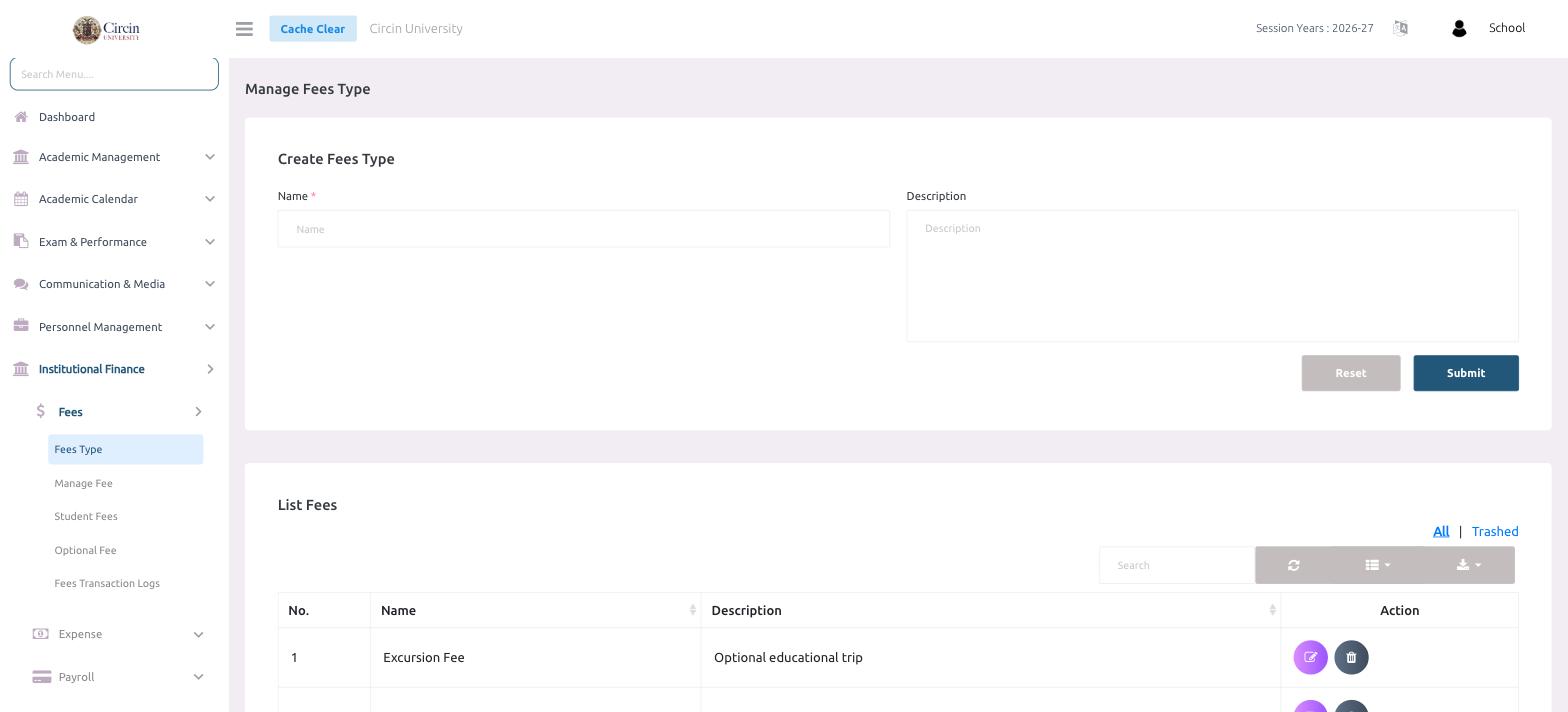
- In the left menu, open Institutional Finance → Fees → Fees Type.
- On the Create Fees Type panel, enter a Name (this field is required, for example Excursion Fee).
- Optionally add a Description to explain what the fee covers, such as Optional educational trip.
- Click Submit. Use Reset to clear the form and start over.
Where do my fees types appear?
Every saved type is listed under List Fees with a No., Name, Description and an Action column to edit or delete it. Use the All and Trashed tabs to switch between active and removed types, and the Search box to find one quickly.
Tips
- Keep names short and generic (for example Tuition Fee) so you can reuse the same type across multiple classes.
- Deleting a type moves it to Trashed rather than removing it permanently.