Fee plans
Build a class fee plan in Circin — name it, pick the classes, add compulsory fee lines with a due date, and choose whether to allow installments.
Updated
School Admin
Manage Fee is where you assemble a full fee plan for one or more classes — a named set of compulsory fees with a due date, late-payment charges, and optional installments.
How do I create a fee plan?
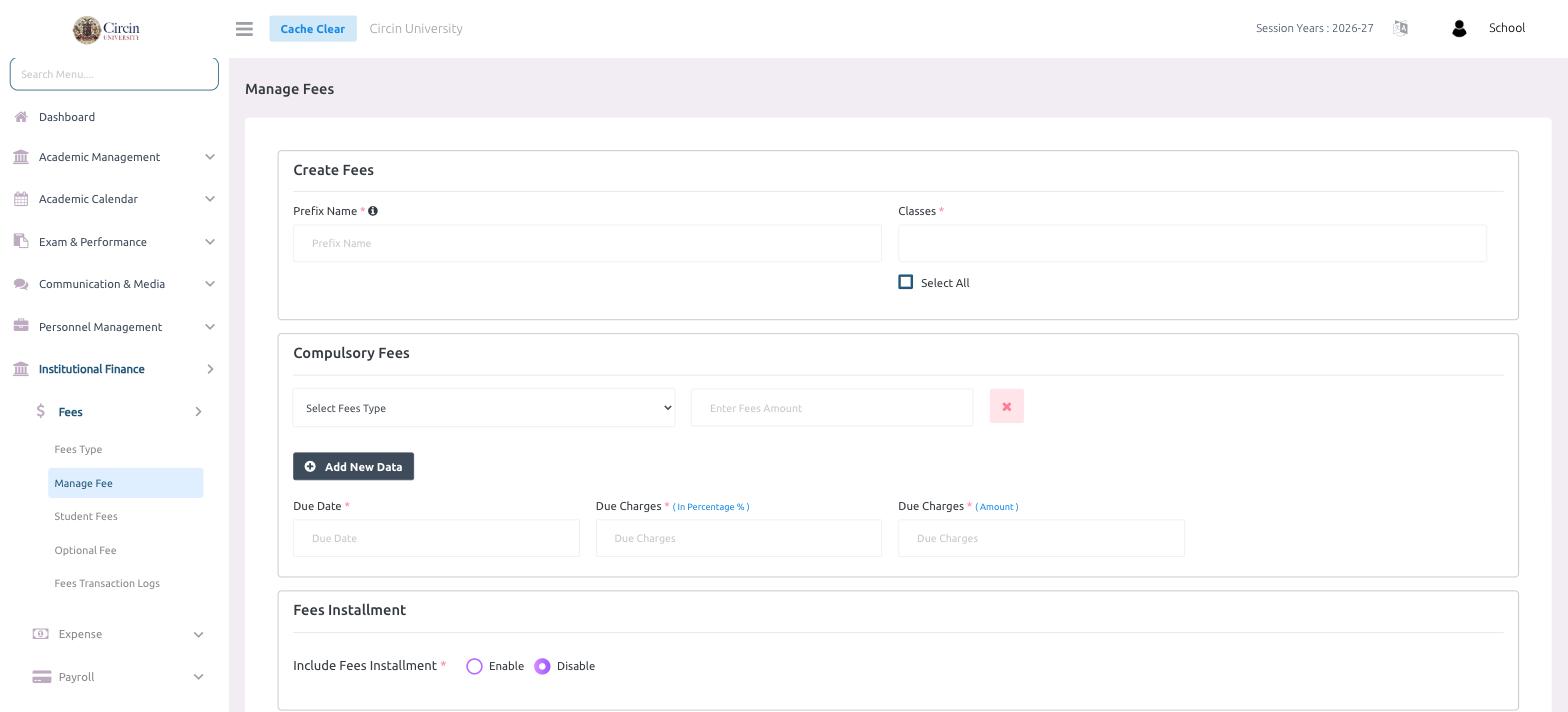
- In the left menu, open Institutional Finance → Fees → Manage Fee.
- Under Create Fees, enter a Prefix Name (required — this labels the plan) and choose the Classes it applies to. Tick Select All to apply it to every class.
- In the Compulsory Fees section, pick a Select Fees Type from the dropdown and Enter Fees Amount. Click Add New Data to add more fee lines.
- Set the Due Date, and the late penalty as Due Charges (In Percentage %) and/or Due Charges (Amount).
- Under Fees Installment, set Include Fees Installment to Enable if families may pay in parts, or leave it Disable for a single payment.
- Submit the form to publish the plan to the selected classes.
Tips
- Add each charge as its own Compulsory Fees line so parents see an itemized breakdown.
- The Due Charges fields drive automatic late fees, so a fee left unpaid past its due date is flagged as Over Due.