Collect fees
See what every student owes, has paid, and still has pending in Circin — filter by class and status, then record a payment from the same screen.
Updated
School Admin
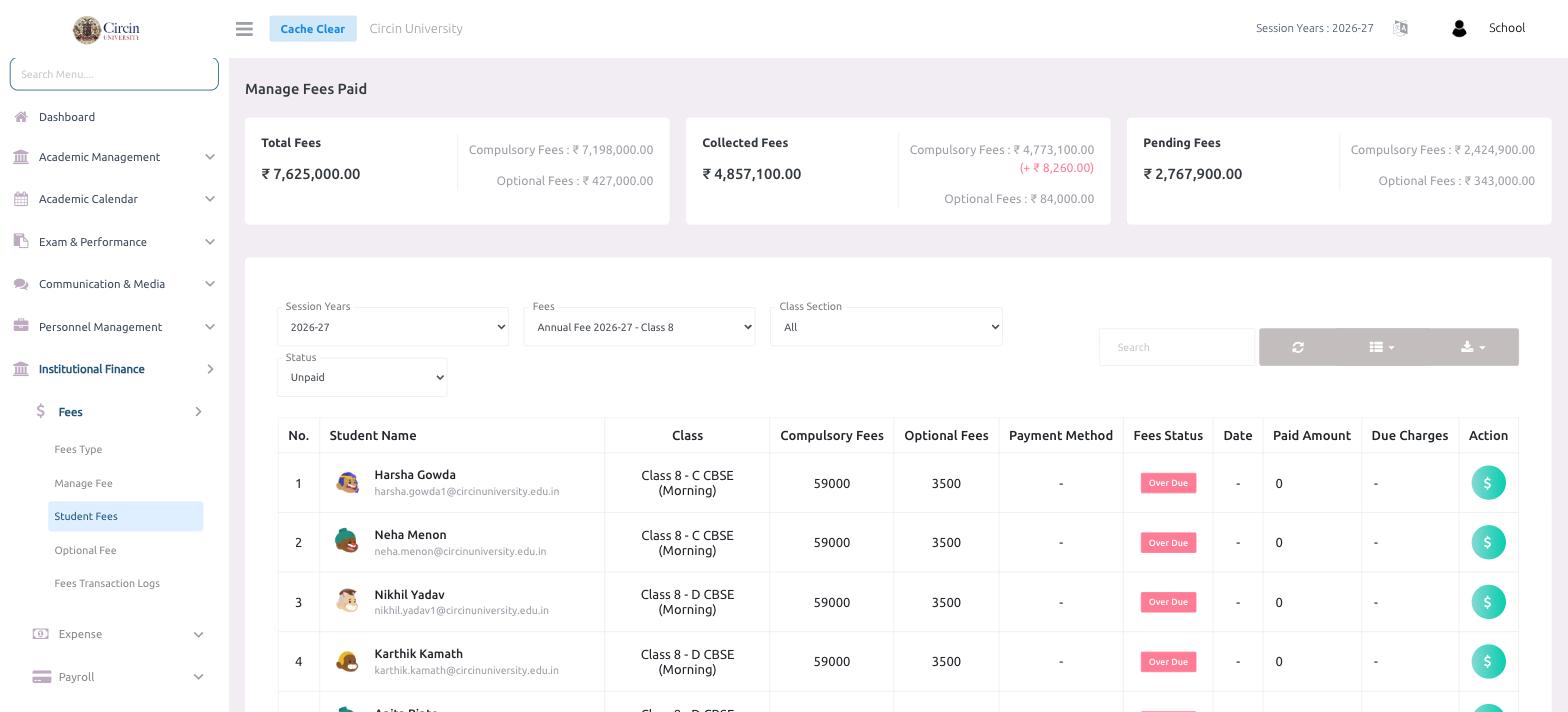
The Student Fees screen (Manage Fees Paid) is your collection dashboard: total, collected, and pending fees at the top, and a per-student table below where you filter, review, and record payments.
Where do I see fees collected and pending?
Three summary cards sit at the top of Institutional Finance → Fees → Student Fees:
- Total Fees — the full amount billed, split into Compulsory Fees and Optional Fees.
- Collected Fees — what has been received so far.
- Pending Fees — the outstanding balance.
How do I find a student's fees?
- In the left menu, open Institutional Finance → Fees → Student Fees.
- Use the filters to narrow the list: Session Years, Fees (for example Annual Fee 2026-27 - Class 8), Class Section, and Status (for example Unpaid).
- The table lists each Student Name, Class, Compulsory Fees, Optional Fees, Payment Method, Fees Status, Date, Paid Amount and Due Charges. An unpaid fee past its due date shows an Over Due badge.
- In the Action column, click the fee (₹) icon on a student's row to record a payment.
Tips
- Use the Search box to jump straight to one student.
- The list-view and export buttons above the table let you download the current filtered list.