Roll numbers
Assign or renumber student roll numbers in Circin from Assign Roll Number — pick a class section, sort the list, and set each student's new roll number.
Updated
School Admin
Staff
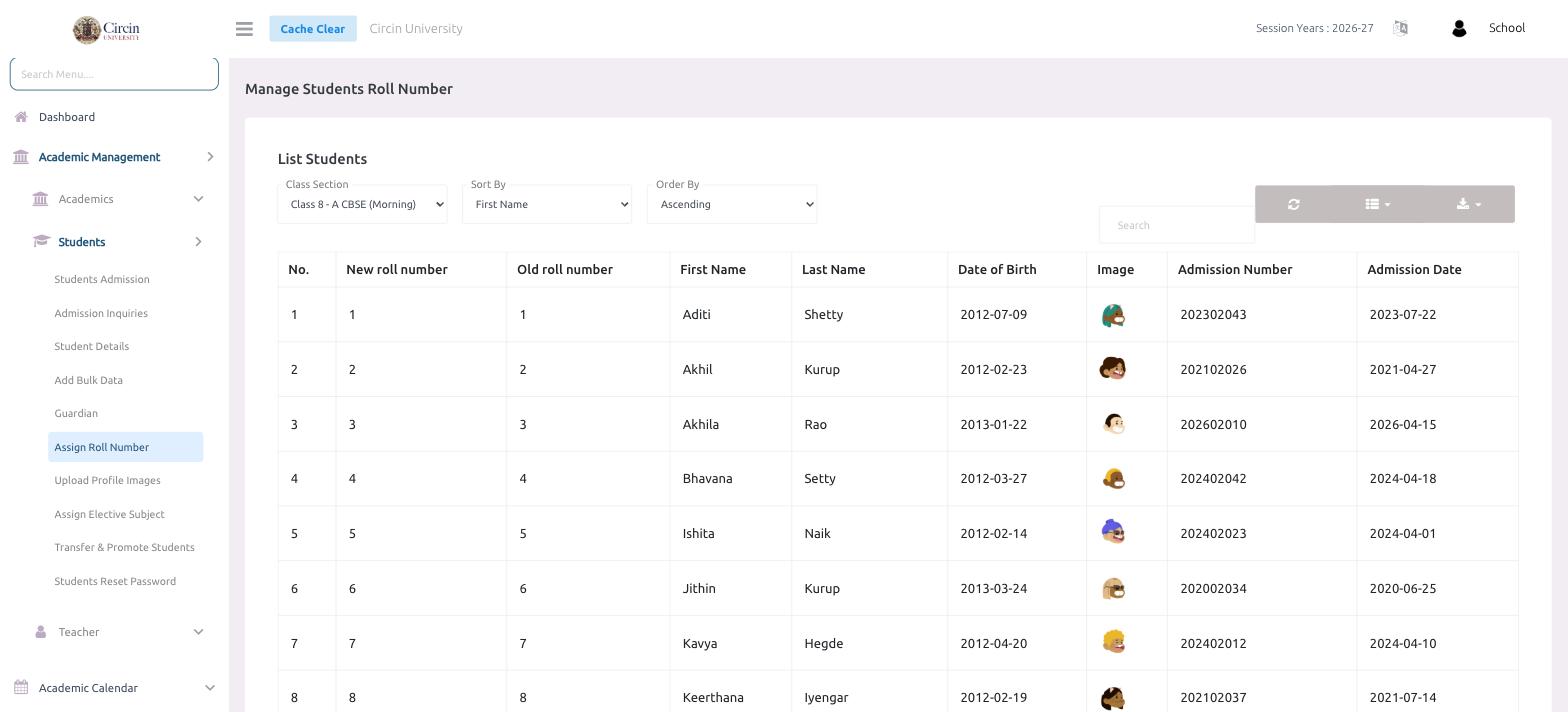
Use Assign Roll Number to set or renumber the roll numbers for a class section in Circin. Choose the section, sort the students the way you want them numbered, and enter each New roll number against the existing one.
How do I assign roll numbers?
- Open Academic Management → Students → Assign Roll Number. The List Students panel loads under Manage Students Roll Number.
- Choose the Class Section (for example, Class 8 - A CBSE (Morning)).
- Set Sort By (such as First Name) and Order By (Ascending or descending) to arrange the list in the order you want to number it.
- For each student, enter the New roll number. The table shows the Old roll number beside it so you can see what's changing, along with First Name, Last Name, Date of Birth, Image, Admission Number, and Admission Date.
- Save to apply the new roll numbers.
Tip: Sort the list first (by name or date of birth) so the roll numbers fall in a consistent order before you enter them.