Teacher report
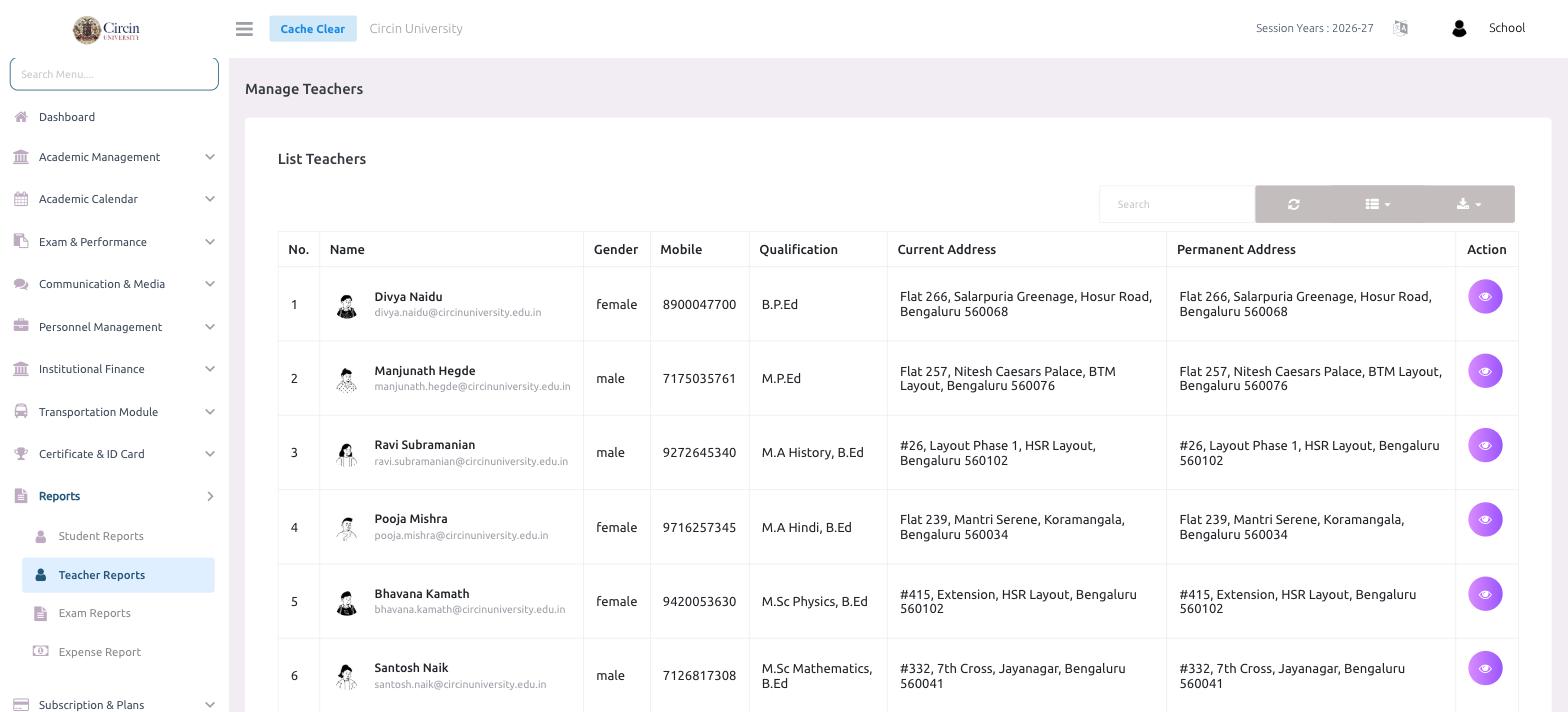
Open Reports then Teacher Reports to see every teacher with their contact, qualification and address details, and export the list.
Updated
School Admin
Staff
The Teacher Reports page shows every teacher at your school in one list, with their contact details, qualifications and addresses. Open it from Reports → Teacher Reports.
How do I view the teacher report?
- In the left menu, open Reports, then click Teacher Reports. The page opens on Manage Teachers → List Teachers.
- Every teacher loads into a table with No., Name (with email beneath), Gender, Mobile, Qualification, Current Address and Permanent Address.
- Click the eye icon in the Action column to open a teacher's full profile.
Can I search or export the list?
Yes. Use the Search box above the table to find a teacher by name, email or mobile. The column-picker and the download icon on the right let you choose the visible columns and export the list for staff records or directories.